ViewModel的定义

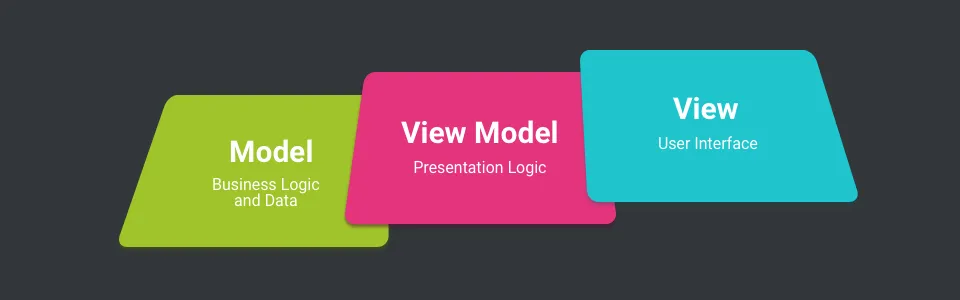
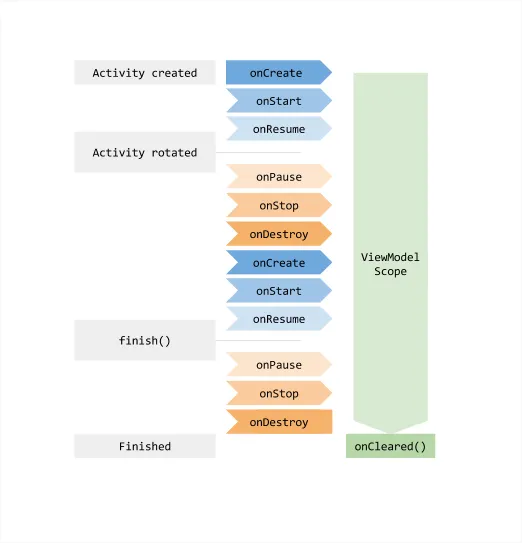
根据Android官方文档,ViewModel旨在以生命周期可感知的方式存储和管理与UI相关的数据。它允许数据在屏幕旋转等配置更改中保留。

alt text

ViewModel总是与作用域(一个Fragment或一个Activity)关联创建,并将保留直到其关联的Activity或Fragment永久处置,这意味着视图数据可以在Fragment/Activity由于旋转而重新创建等事件中被保留下来。 ViewModel的主要职责包括:

  • 为Activity或Fragment准备和管理数据。
  • 在配置更改期间保留数据,例如旋转。
  • 处理Activity/Fragment与程序其余部分的通信(例如调用业务逻辑类)。

ViewModel将视图数据和逻辑的所有权与像Activities和Fragments这样与生命周期绑定的实体分离开来。ViewModel不仅消除了常见的生命周期问题,还有助于构建更模块化且更易于测试的UI。 Activity或Fragment可以通过LiveData或Android Data Binding观察ViewModel中的更改。 注意:ViewModel的唯一责任是管理UI的数据。它不应访问你的视图层次结构或持有对Activity或Fragment的引用。

alt text

ViewModel是如何在配置更改中保存数据的?

首先,让我们查看Android文档,看看ViewModel是如何使用的。以下代码是一个示例。

获得ViewModel实例:

1
2
3
4
5
6
7
8
9
10
11
12
13
14
15
16
17
18
public class MainActivity extends Activity {

@Override
protected void onCreate(Bundle savedInstanceState) {
super.onCreate(savedInstanceState);
setContentView(R.layout.activity_main);

MyViewModel viewModel = ViewModelProviders.of(this).get(MyViewModel.class);

viewModel.getUsers().observer(this, new Observer() {
@Override
public void onChanged(@Nullable User data) {
// update the ui.
}
});

}
}

编写ViewModel实现类

1
2
3
4
5
6
7
8
9
10
11
12
13
14
15
16
17

public class MyViewModel extends ViewModel {

private MutableLiveData<List<User>> users;

public LiveData<List<User>> getUsers() {
if (users == null) {
users = new MutableLiveData<List<User>>();
loadUsers();
}
return users;
}

private void loadUsers() {
// perform an asynchronous operation to fetch users.
}
}

alt text

让我们深入了解每个类及其方法,从ViewModelProviders.of开始:

1
2
3
4
5
6
7
8
9
10
11
12
13
14
15
16
17
18
19
20
21
22
23
24

/**
* Utilities methods for {@link ViewModelStore} class.
*/
public class ViewModelProviders {
/**
* Creates a {@link ViewModelProvider}, which retains ViewModels while a scope of given Activity
* is alive. More detailed explanation is in {@link ViewModel}.
* <p>
* It uses {@link ViewModelProvider.AndroidViewModelFactory} to instantiate new ViewModels.
*
* @param activity an activity, in whose scope ViewModels should be retained
* @return a ViewModelProvider instance
*/
@NonNull
@MainThread
public static ViewModelProvider of(@NonNull FragmentActivity activity) {
ViewModelProvider.AndroidViewModelFactory factory =
ViewModelProvider.AndroidViewModelFactory.getInstance(
checkApplication(activity));
return new ViewModelProvider(ViewModelStores.of(activity), factory);
}

}

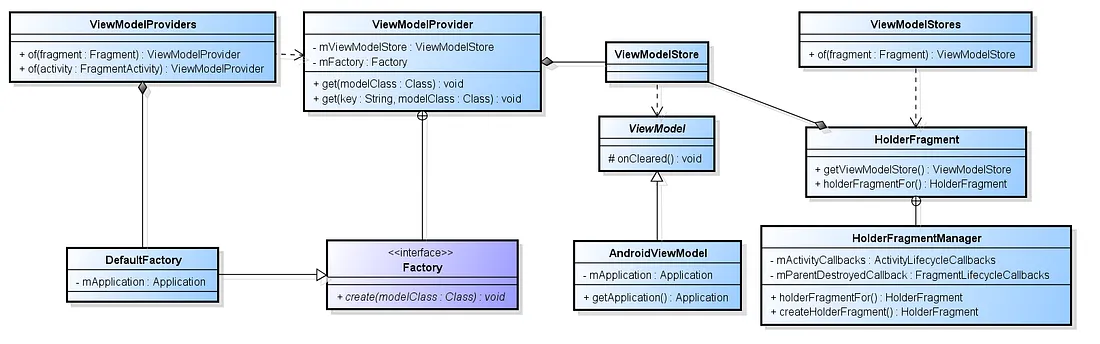
ViewModelProviders.of只是一个ViewModelProvider的工厂,它依赖于ViewModelFactory和ViewModelStore。

ViewModelFactory

ViewModelProviders.of(this).get(MyViewModel.class)使用反射来实例化传递给它的ViewModel类。

1
2
3
4
5
6
7
8
9
10
11
12
13
14
15
16
17
18
19
20

/**
* Simple factory, which calls empty constructor on the give class.
*/
public static class NewInstanceFactory implements Factory {

@SuppressWarnings("ClassNewInstance")
@NonNull
@Override
public <T extends ViewModel> T create(@NonNull Class<T> modelClass) {
//noinspection TryWithIdenticalCatches
try {
return modelClass.newInstance();
} catch (InstantiationException e) {
throw new RuntimeException("Cannot create an instance of " + modelClass, e);
} catch (IllegalAccessException e) {
throw new RuntimeException("Cannot create an instance of " + modelClass, e);
}
}
}

如果ViewModel类是AndroidViewModel类型,则会创建一个新实例,并将Application实例作为构造函数中的参数传递进来。

1
2
3
4
5
6
7
8
9
10
11
12
13
14
15
16
17
18
19
20
21
22
23
24
25
26
27
28
29
30
31
32
33
34
35
36
37
38
39
40
41
42
43
44
45
46
47
48
49
50
51
52
53

/**
* {@link Factory} which may create {@link AndroidViewModel} and
* {@link ViewModel}, which have an empty constructor.
*/
public static class AndroidViewModelFactory extends ViewModelProvider.NewInstanceFactory {

private static AndroidViewModelFactory sInstance;

/**
* Retrieve a singleton instance of AndroidViewModelFactory.
*
* @param application an application to pass in {@link AndroidViewModel}
* @return A valid {@link AndroidViewModelFactory}
*/
public static AndroidViewModelFactory getInstance(@NonNull Application application) {
if (sInstance == null) {
sInstance = new AndroidViewModelFactory(application);
}
return sInstance;
}

private Application mApplication;

/**
* Creates a {@code AndroidViewModelFactory}
*
* @param application an application to pass in {@link AndroidViewModel}
*/
public AndroidViewModelFactory(@NonNull Application application) {
mApplication = application;
}

@NonNull
@Override
public <T extends ViewModel> T create(@NonNull Class<T> modelClass) {
if (AndroidViewModel.class.isAssignableFrom(modelClass)) {
//noinspection TryWithIdenticalCatches
try {
return modelClass.getConstructor(Application.class).newInstance(mApplication);
} catch (NoSuchMethodException e) {
throw new RuntimeException("Cannot create an instance of " + modelClass, e);
} catch (IllegalAccessException e) {
throw new RuntimeException("Cannot create an instance of " + modelClass, e);
} catch (InstantiationException e) {
throw new RuntimeException("Cannot create an instance of " + modelClass, e);
} catch (InvocationTargetException e) {
throw new RuntimeException("Cannot create an instance of " + modelClass, e);
}
}
return super.create(modelClass);
}
}

创建自定义ViewModelProviderFactory

你也可以创建一个自定义工厂类,继承一个 ViewModelFactory 的泛型类,并在其中初始化你的 ViewModel 类,根据需要传递数据进行初始化。

1
2
3
4
5
6
7
8
9
10
11
12
13
14
15
16
17
18
19
20
21
22
23
24
25
26
27
28
29
30
31

public class MyViewModelFactory extends ViewModelProvider.NewInstanceFactory {

private String data1;
private String data2;

public MyViewModelFactory(String data1, String data2) {
this.data1 = data1;
this.data2 = data2;
}

@NonNull
@Override
public <T extends ViewModel> T create(@NonNull Class<T> modelClass) {
if (MyViewModel.class.isAssignableFrom(modelClass)) {
try {
return modelClass.getConstructor(MyViewModel.class).newInstance(data1, data2);
} catch (InstantiationException e) {
e.printStackTrace();
} catch (IllegalAccessException e) {
e.printStackTrace();
} catch (InvocationTargetException e) {
e.printStackTrace();
} catch (NoSuchMethodException e) {
e.printStackTrace();
}
}
return super.create(modelClass);
}

}

你可以在请求ViewModel实例时将上面创建的工厂传递给ViewModelProviders类。

1
2
3
//initializing the custom factory class 
MyViewModelFactory factory = new MyViewModelFactory(data1, data2);
ViewModelProviders.of(this, factory).get(MyViewModel.class);

注意:如果ViewModel类是AndroidViewModel类型,则会创建一个新实例,并将应用作为构造函数中的单个参数传递,否则将调用父实现。

ViewModelStores

这个类的作用是对HolderFragmentManager内的holderFragmentOf(Activity/Fragment)静态方法的调用进行抽象化。这个方法将负责返回一个ViewModelStoreOwner。

1
2
3
4
5
6
7
8
9
10
11
12
13
14
15
16
17
18
19
20
21
22
23
24
25
26
27
28
29
30
31
32
33
34
35
36
37
38
39
40

/**
* Factory methods for {@link ViewModelStore} class.
*/
@SuppressWarnings("WeakerAccess")
public class ViewModelStores {

private ViewModelStores() {
}

/**
* Returns the {@link ViewModelStore} of the given activity.
*
* @param activity an activity whose {@code ViewModelStore} is requested
* @return a {@code ViewModelStore}
*/
@NonNull
@MainThread
public static ViewModelStore of(@NonNull FragmentActivity activity) {
if (activity instanceof ViewModelStoreOwner) {
return ((ViewModelStoreOwner) activity).getViewModelStore();
}
return holderFragmentFor(activity).getViewModelStore();
}

/**
* Returns the {@link ViewModelStore} of the given fragment.
*
* @param fragment a fragment whose {@code ViewModelStore} is requested
* @return a {@code ViewModelStore}
*/
@NonNull
@MainThread
public static ViewModelStore of(@NonNull Fragment fragment) {
if (fragment instanceof ViewModelStoreOwner) {
return ((ViewModelStoreOwner) fragment).getViewModelStore();
}
return holderFragmentFor(fragment).getViewModelStore();
}
}

ViewModelStores.of似乎类似于ViewModelProviders.of方法,在需要时创建ViewModelStore的新实例。

ViewModelStore

一个简单的存储器,其中包含一个HashMap<String, ViewModel>,其中键是视图模型的类名,值是ViewModel本身。

1
2
3
4
5
6
7
8
9
10
11
12
13
14
15
16
17
18
19
20
21
22
23
24
25
26
27
28
29
30
31
32
33
34
35
36
37
38
39
40
41
42

/**
* Class to store {@code ViewModels}.
* <p>
* An instance of {@code ViewModelStore} must be retained through configuration changes:
* if an owner of this {@code ViewModelStore} is destroyed and recreated due to configuration
* changes, new instance of an owner should still have the same old instance of
* {@code ViewModelStore}.
* <p>
* If an owner of this {@code ViewModelStore} is destroyed and is not going to be recreated,
* then it should call {@link #clear()} on this {@code ViewModelStore}, so {@code ViewModels} would
* be notified that they are no longer used.
* <p>
* {@link android.arch.lifecycle.ViewModelStores} provides a {@code ViewModelStore} for
* activities and fragments.
*/
public class ViewModelStore {

private final HashMap<String, ViewModel> mMap = new HashMap<>();

final void put(String key, ViewModel viewModel) {
ViewModel oldViewModel = mMap.get(key);
if (oldViewModel != null) {
oldViewModel.onCleared();
}
mMap.put(key, viewModel);
}

final ViewModel get(String key) {
return mMap.get(key);
}

/**
* Clears internal storage and notifies ViewModels that they are no longer used.
*/
public final void clear() {
for (ViewModel vm : mMap.values()) {
vm.onCleared();
}
mMap.clear();
}
}

ViewModelStoreOwner

顾名思义,是ViewModelStore的所有者。这可以是任何实现了该接口定义的getViewModelStore()方法的类。

1
2
3
4
5
6
7
8
9
10
11
12
13
14
15
16
17
18

/**
* A scope that owns {@link ViewModelStore}.
* <p>
* A responsibility of an implementation of this interface is to retain owned ViewModelStore
* during the configuration changes and call {@link ViewModelStore#clear()}, when this scope is
* going to be destroyed.
*/
@SuppressWarnings("WeakerAccess")
public interface ViewModelStoreOwner {
/**
* Returns owned {@link ViewModelStore}
*
* @return a {@code ViewModelStore}
*/
@NonNull
ViewModelStore getViewModelStore();
}

在该库中,ViewModelStoreOwner即是HolderFragment。该类具有一个ViewModelStore变量,可以通过getViewModelStore()方法访问。

HolderFragment

HolderFragment是一个普通的Android无界面Fragment。它充当一个容器,在它的 ViewModelStore 中存储所有活动周期内的 ViewModel 对象。

1
2
3
4
5
6
7
8
9
10
11
12
13
14
15
16
17
18
19
20
21
22
23
24
25
26
27
28
29
30
31
32
33
34
35
36
37
38
39
40
41
42
43
44
45
46
47
48
49
50
51
52
53
54
55
56
57
58
59
60
61
62
63
64
65
66
67
68
69
70
71
72
73
74
75
76
77
78
79
80
81
82
83
84
85
86
87
88
89
90
91
92
93
94
95
96
97
98
99
100
101
102
103
104
105
106
107
108
109
110
111
112
113
114
115
116
117
118
119
120
121
122
123
124
125
126
127
128
129
130
131
132
133
134
135
136
137
138
139
140
141
142
143
144
145
146
147
148
149
150
151
152
153
154
155
156
157
158

public class HolderFragment extends Fragment implements ViewModelStoreOwner {
private static final String LOG_TAG = "ViewModelStores";

private static final HolderFragmentManager sHolderFragmentManager = new HolderFragmentManager();

/**
* @hide
*/
@RestrictTo(RestrictTo.Scope.LIBRARY_GROUP)
public static final String HOLDER_TAG =
"android.arch.lifecycle.state.StateProviderHolderFragment";

private ViewModelStore mViewModelStore = new ViewModelStore();

public HolderFragment() {
setRetainInstance(true);
}

@Override
public void onCreate(@Nullable Bundle savedInstanceState) {
super.onCreate(savedInstanceState);
sHolderFragmentManager.holderFragmentCreated(this);
}

@Override
public void onSaveInstanceState(Bundle outState) {
super.onSaveInstanceState(outState);
}

@Override
public void onDestroy() {
super.onDestroy();
mViewModelStore.clear();
}

@NonNull
@Override
public ViewModelStore getViewModelStore() {
return mViewModelStore;
}

/**
* @hide
*/
@RestrictTo(RestrictTo.Scope.LIBRARY_GROUP)
public static HolderFragment holderFragmentFor(FragmentActivity activity) {
return sHolderFragmentManager.holderFragmentFor(activity);
}

/**
* @hide
*/
@RestrictTo(RestrictTo.Scope.LIBRARY_GROUP)
public static HolderFragment holderFragmentFor(Fragment fragment) {
return sHolderFragmentManager.holderFragmentFor(fragment);
}

@SuppressWarnings("WeakerAccess")
static class HolderFragmentManager {
private Map<Activity, HolderFragment> mNotCommittedActivityHolders = new HashMap<>();
private Map<Fragment, HolderFragment> mNotCommittedFragmentHolders = new HashMap<>();

private ActivityLifecycleCallbacks mActivityCallbacks =
new EmptyActivityLifecycleCallbacks() {
@Override
public void onActivityDestroyed(Activity activity) {
HolderFragment fragment = mNotCommittedActivityHolders.remove(activity);
if (fragment != null) {
Log.e(LOG_TAG, "Failed to save a ViewModel for " + activity);
}
}
};

private boolean mActivityCallbacksIsAdded = false;

private FragmentLifecycleCallbacks mParentDestroyedCallback =
new FragmentLifecycleCallbacks() {
@Override
public void onFragmentDestroyed(FragmentManager fm, Fragment parentFragment) {
super.onFragmentDestroyed(fm, parentFragment);
HolderFragment fragment = mNotCommittedFragmentHolders.remove(
parentFragment);
if (fragment != null) {
Log.e(LOG_TAG, "Failed to save a ViewModel for " + parentFragment);
}
}
};

void holderFragmentCreated(Fragment holderFragment) {
Fragment parentFragment = holderFragment.getParentFragment();
if (parentFragment != null) {
mNotCommittedFragmentHolders.remove(parentFragment);
parentFragment.getFragmentManager().unregisterFragmentLifecycleCallbacks(
mParentDestroyedCallback);
} else {
mNotCommittedActivityHolders.remove(holderFragment.getActivity());
}
}

private static HolderFragment findHolderFragment(FragmentManager manager) {
if (manager.isDestroyed()) {
throw new IllegalStateException("Can't access ViewModels from onDestroy");
}

Fragment fragmentByTag = manager.findFragmentByTag(HOLDER_TAG);
if (fragmentByTag != null && !(fragmentByTag instanceof HolderFragment)) {
throw new IllegalStateException("Unexpected "
+ "fragment instance was returned by HOLDER_TAG");
}
return (HolderFragment) fragmentByTag;
}

private static HolderFragment createHolderFragment(FragmentManager fragmentManager) {
HolderFragment holder = new HolderFragment();
fragmentManager.beginTransaction().add(holder, HOLDER_TAG).commitAllowingStateLoss();
return holder;
}

HolderFragment holderFragmentFor(FragmentActivity activity) {
FragmentManager fm = activity.getSupportFragmentManager();
HolderFragment holder = findHolderFragment(fm);
if (holder != null) {
return holder;
}
holder = mNotCommittedActivityHolders.get(activity);
if (holder != null) {
return holder;
}

if (!mActivityCallbacksIsAdded) {
mActivityCallbacksIsAdded = true;
activity.getApplication().registerActivityLifecycleCallbacks(mActivityCallbacks);
}
holder = createHolderFragment(fm);
mNotCommittedActivityHolders.put(activity, holder);
return holder;
}

HolderFragment holderFragmentFor(Fragment parentFragment) {
FragmentManager fm = parentFragment.getChildFragmentManager();
HolderFragment holder = findHolderFragment(fm);
if (holder != null) {
return holder;
}
holder = mNotCommittedFragmentHolders.get(parentFragment);
if (holder != null) {
return holder;
}

parentFragment.getFragmentManager()
.registerFragmentLifecycleCallbacks(mParentDestroyedCallback, false);
holder = createHolderFragment(fm);
mNotCommittedFragmentHolders.put(parentFragment, holder);
return holder;
}
}
}

谁持有HolderFragment?

HolderFragmentManager

HolderFragment有一个名为HolderFragmentManager的内部静态类。HolderFragmentManager创建和管理HolderFragment实例。
创建实例后,将它们关联到一个Activity或Fragment。
整个过程使用holderFragmentFor(Activity)和holderFragmentFor(Fragment)方法完成。
如果没有HolderFragment的实例,这些方法将:

  • 创建一个HolderFragment的实例。
  • 将新实例添加到父(Activity/Fragment)FragmentManager。这将导致HolderFragment内部ViewModel的作用范围扩大。
  • 向Activity/Fragment的生命周期注册一个回调函数onDestroy()。因为HolderFragment位于Activity/Fragment的FragmentManager中,所以当Activity/Fragment被销毁时,其onDestroy()方法将被调用,并且ViewModelStore将被清除。最后,当注册的回调被调用时,HolderFragment实例将从与其Activity/Fragment关联的HolderFragmentManager的HashMap中移除。
  • 将holder Fragment添加到一个HashMap中,其中键是Activity/Fragment。
  • 返回HolderFragment实例。

当已经存在HolderFragment的实例时,这些方法将查找并返回已经在HashMap中的实例。

HolderFragment如何保持状态?

通过将保留实例设置为true并不提供视图,HolderFragment本质上变成了一个无界面Fragment,在Activity未被销毁的情况下会被保留。

1
2
3
public HolderFragment() {
setRetainInstance(true);
}

控制一个Fragment实例是否在Activity重新创建(如配置更改)时保留。这只能用于不在返回栈中的Fragment。如果设置了这个选项,在Activity重新创建时Fragment的生命周期会稍有不同:

  • onDestroy()不会被调用(但onDetach()仍会被调用,因为Fragment正在从当前Activity中分离)。
  • 由于Fragment没有被重新创建,onCreate(Bundle)不会被调用。
  • onAttach(Activity)和onActivityCreated(Bundle)仍会被调用。

获取ViewModel实例

由于我们对ViewModelProvider的创建和其依赖关系有了基本的了解,我们现在将深入探讨它如何创建和检索ViewModel实例,并在整个配置更改过程中保持它们。让我们来看一下方法调用:

1
get(MyViewModel.class)

它尝试从Map中检索一个MyViewModel实例。如果没有找到,则使用工厂来创建它,然后将其存储到HashMap<String, ViewModel>中。为了检索已创建的ViewModel,键被命名为类的名字。

总结

在本文中,我探讨了新的ViewModel类的基础知识。主要包括:

  • ViewModel类旨在以生命周期感知的方式保存和管理与UI相关的数据。这使得数据能够在配置更改(如屏幕旋转)中存活。
  • ViewModel将UI实现与应用程序数据分离。
  • ViewModel的生命周期感知自关联的UI控制器首次创建之时,直到完全销毁。
  • 永远不要直接或间接地将UI控制器或Context存储在ViewModel中。这包括在ViewModel中存储View。直接或间接引用UI控制器会破坏将UI与数据分离的目的,并可能导致内存泄漏。
  • HolderFragment是一个无界面Fragment(没有UI),通过setRetainInstance(true)添加到Fragment堆栈中。